PTZ Flow
PTZ Flow! Camera Control, Simplified.
Elevate your production with PTZ Flow. Turn any supported USB joystick or gamepad into a precision control station for your PTZ cameras — works on both Mac and PC.
Features
Everything you need to run your PTZ cameras live
Use your own device
Use any supported gamepad or joystick to control your camera. Bind any stick or button to Pan, Tilt, Zoom, or camera switching.
Speed control
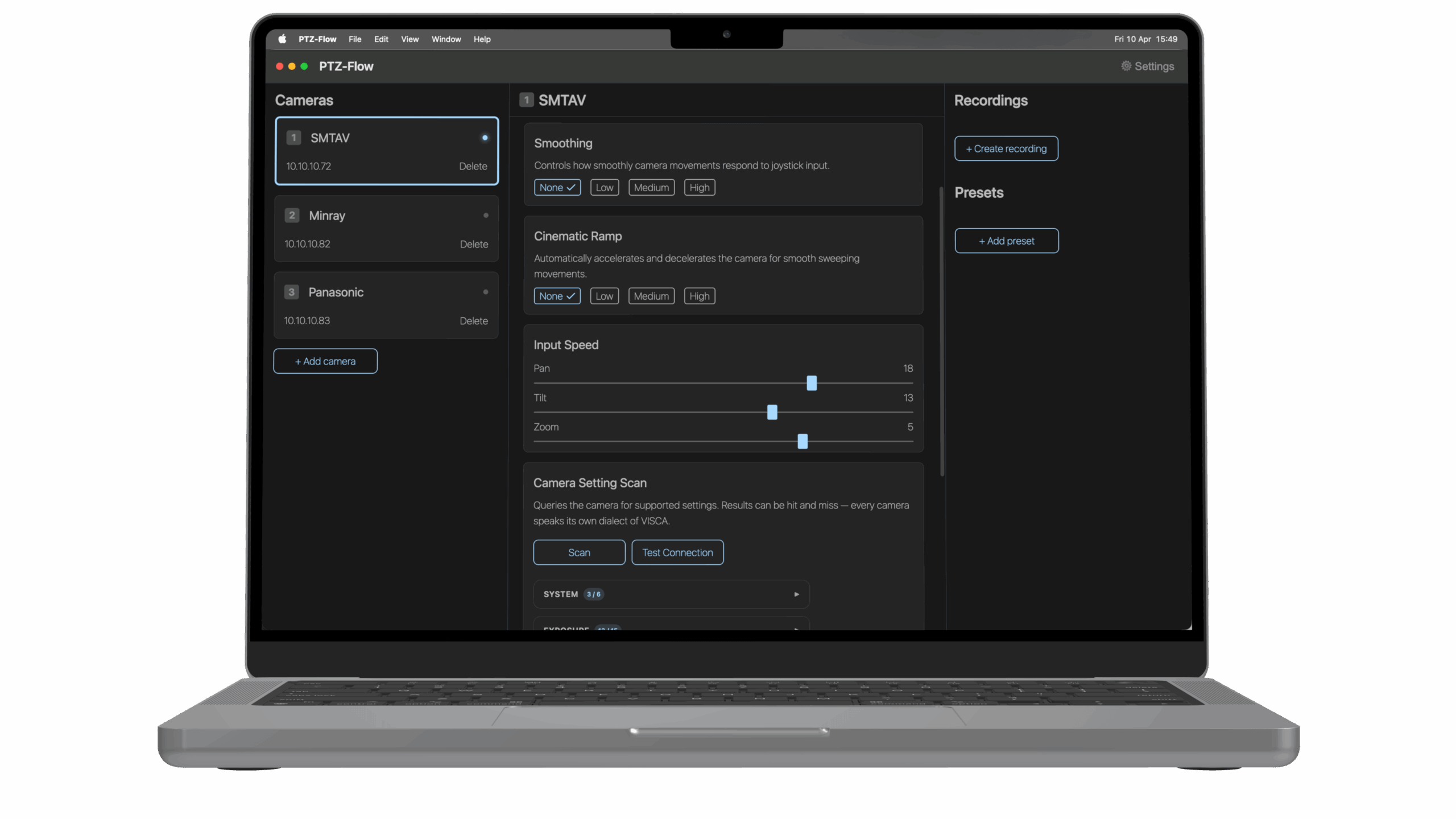
Set speed for Pan, Tilt and Zoom. Settings are saved individually per camera.
Cinematic ramp
Control the start and stop of your movements in three levels.

Control from anywhere
Control functions via HTTP-commands, works with Streamdeck!
Recordings and Presets
Record any movement and play it back, set presets to easy recall positions.
Camera settings
Scan camera settings and control exposure, white balance etc from one place.
AI face tracking will be included for all PTZ Flow licenses at no extra cost, whether you buy now or later.
FAQ
Frequently asked questions
Can I use any gamepad or joystick?
No, it must be a supported joystick or gamepad. Since the app is directly connected to the raw data of the input, we need to map every device.Read more about supported devices here.If your device isn't listed, just let us know. We'd be happy to help add support for your gamepad or joystick!
Problem installing or opening PTZ-Flow?
Getting a warning that PTZ-Flow is "damaged", from an "unverified developer", or blocked by Windows SmartScreen? The app is completely safe — this happens because it isn't code-signed yet. Follow the step-by-step fix for your OS:
How many cameras can I add in PTZ Flow?
You can add as many as you want in the paid version, while the demo version is capped to 1 camera for testing purposes.
How many recordings and presets can I add?
There is a limit for presets — whatever the camera can handle, often above 200. Recordings are stored in the app and there is no limit there.
I want to use PTZ-Flow on more than one PC?
Every purchase is for one PC. You can deactivate your license at any time and move PTZ Flow to a new PC.
I have a controller that is not supported, can it be added?
Yes, please reach out to our support e-mail and we'll get in touch.
Does PTZ Flow work on Mac and Windows?
Yes, we support macOS (Intel and Apple Silicon) as well as Windows 11.
Can I use my controller wireless?
Currently, we only support the GameSir Nova Lite as a wireless controller. Generally, you will experience good performance when a gamepad has its own dedicated dongle and communicates over 2.4GHz. However, we strongly suggest using a cable regardless — this ensures there are no issues with interference or battery loss. Please note that we do not support any controllers over Bluetooth.
Get started
Ready to try PTZ Flow?
Download PTZ Flow and turn your joystick or gamepad into a precision control station for your PTZ cameras.